CRM Comparison 2026: Salesforce vs Dynamics 365 vs HubSpot
Salesforce, Dynamics 365, and HubSpot are the three CRMs that most enterprise and mid-market buyers end up shortlisting. Salesforce leads enterprise customization and ecosystem size. HubSpot leads ease of use and bundled marketing. Dynamics 365 is the pick for organizations already standardized on Microsoft. This guide compares all three across pricing, total cost of ownership, features, AI capabilities, job demand, and fit by company stage. The right choice depends on your sales motion, existing tech stack, and how much administrative overhead you can absorb. We focus on what you will actually pay, what it takes to implement, and which platform matches your team size and growth motion. Vendor marketing makes every CRM sound like it can do everything. The real differences show up in configuration effort, admin requirements, integration depth, and how quickly your team can get value from the platform.
Salesforce vs Dynamics 365 vs HubSpot in 2026: Compare pricing, features, AI, and job demand. See which CRM fits your business size and tech stack.
The Quick Verdict
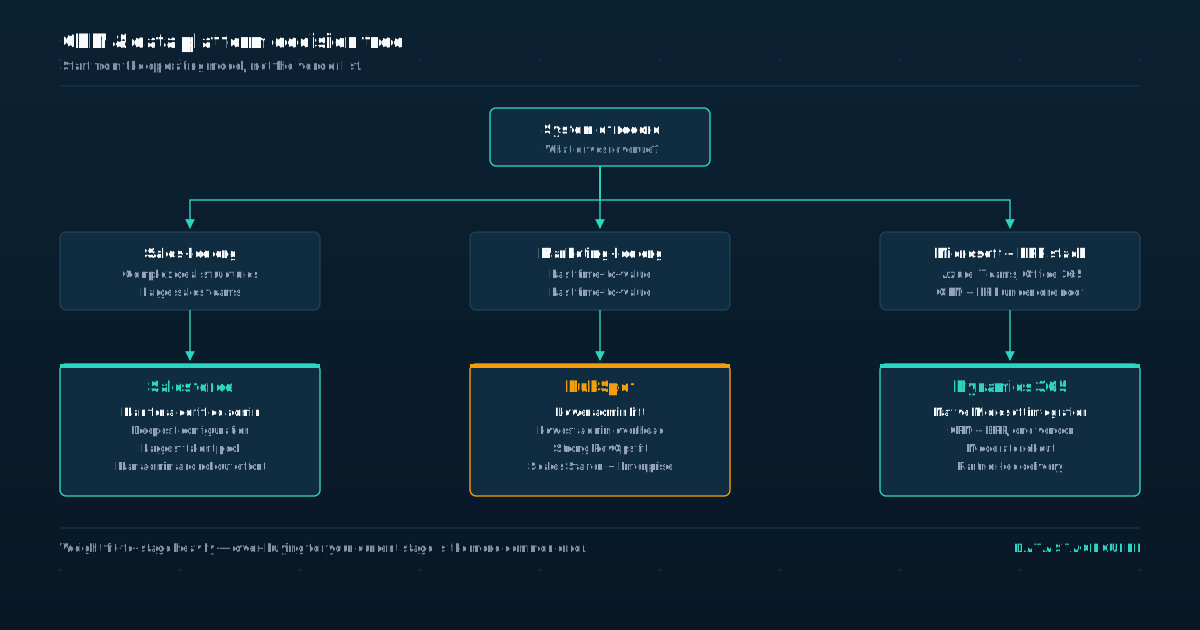
HubSpot for marketing-led companies under roughly 200 employees that want fast time-to-value and minimal admin overhead. Salesforce for sales-led organizations with complex deal structures, large teams, and a budget for dedicated administrators.
Dynamics 365 for companies already invested in Microsoft Azure, Teams, and Office 365, or those that want CRM and ERP under one vendor.
- That is the short answer for most buyers.
- The remaining decision factors depend on compliance needs, integration requirements, and how much customization you actually require.
- Choosing the wrong CRM is usually less expensive than over-buying for your current stage, so weight fit-to-stage heavily.
A small team on an enterprise platform burns cash on configuration and admin salaries before seeing any return. A large team on a starter tier hits feature walls within months.
The pattern we see repeatedly: companies buy Salesforce because of brand recognition, then spend a year and a consulting budget trying to make it fit a simple sales motion. Or they start on HubSpot Free, grow past its limits, and delay migration because the switching cost feels high.
Dynamics 365 gets ignored by buyers who do not realize how much it saves when they already have Microsoft licensing in place. Your sales motion should drive this decision more than anything else. If your revenue comes from inbound marketing and nurture sequences, HubSpot is built for that workflow.
If your revenue comes from field sales with multi-stakeholder deals, Salesforce handles that complexity better.
If your company already runs on Microsoft infrastructure and your IT team manages it, Dynamics 365 slots into that environment with less friction than either competitor.
Pricing: What You Will Actually Pay
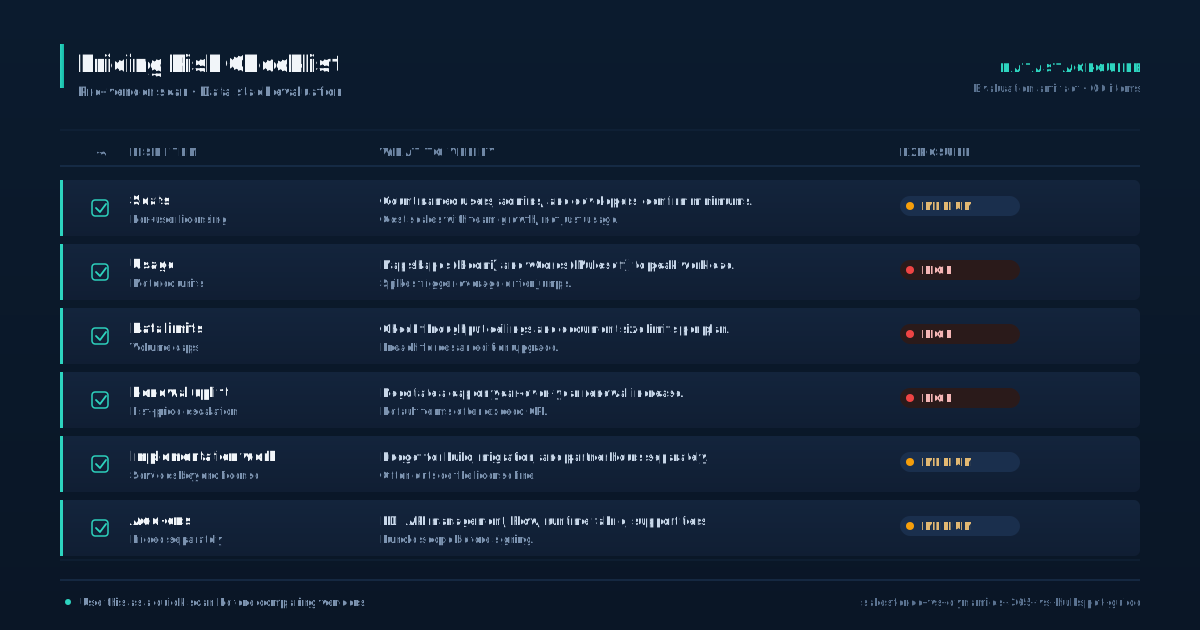
List prices are a starting point, not the full picture. HubSpot starts with a free tier and scales up through Starter, Professional, and Enterprise. Salesforce starts at a low per-user price for Essentials-level features but most sales teams land on Enterprise or Unlimited.
- Dynamics 365 Sales starts at a mid-range per-user price for Professional and increases for Enterprise.
- You can review current list pricing at the <a href="https://www.
- Com/products/sales-cloud/pricing/" target="_blank" rel="noopener noreferrer">Salesforce Sales Cloud pricing page</a> and the <a href="https://dynamics.
Salesforce. Microsoft. Com/sales/pricing/" target="_blank" rel="noopener noreferrer">Dynamics 365 Sales pricing page</a>. For a 50-person sales team, annual license costs alone tend to rank HubSpot lowest, Dynamics 365 in the middle, and Salesforce highest.
But licenses are only part of the story. Add marketing automation, onboarding, implementation, and ongoing administration, and the gaps widen. Salesforce commonly requires a dedicated administrator, which adds a full salary on top of licenses. Dynamics 365 often leans on existing Microsoft IT staff.
HubSpot can frequently be managed by a RevOps team without a specialized hire. A few pricing factors matter. HubSpot prices by tier and by marketing contacts, so a large marketing database can push costs up faster than a large sales team. Salesforce add-ons like Marketing Cloud, Pardot, and CPQ stack quickly.
Dynamics 365 is modular, so you can buy Sales, Customer Service, and Marketing separately, which helps control cost but complicates planning. Always model three-year total cost, not first-year list price. The vendor pricing pages give you the starting numbers, but your real cost model needs to include the people and integrations around the software.
A platform that looks cheaper on a pricing page can cost more once you factor in the headcount required to run it.
Total Cost of Ownership Beyond Licenses
License cost is the visible part of CRM spending. The hidden costs fall into four buckets that most buyers underestimate. First, implementation.
- Salesforce implementations are typically the most involved because the platform rewards deep configuration.
- A mid-market Salesforce rollout often takes months with a certified consulting partner.
- Dynamics 365 implementations are moderate and often handled by Microsoft partners already working with your IT team.
HubSpot implementations are usually the fastest, with many teams self-onboarding within weeks rather than months. Second, ongoing administration. Salesforce almost always needs a certified admin or a managed service provider. Dynamics 365 needs someone comfortable with Power Platform and the Microsoft admin center.
HubSpot can often be run by marketing operations or RevOps without a dedicated CRM hire. The <a href="https://learn. Microsoft. Com/en-us/dynamics365/" target="_blank" rel="noopener noreferrer">Microsoft Dynamics 365 documentation</a> gives a sense of how much platform knowledge an admin needs to manage the system effectively.
Third, integrations. Salesforce has the largest integration ecosystem but many integrations are paid apps. Dynamics 365 integrates natively with Microsoft tools but third-party connectors are fewer. HubSpot has a strong native app marketplace and good built-in sync for common tools, as documented in the <a href="https://developers.
Hubspot. Com/docs/api/overview" target="_blank" rel="noopener noreferrer">HubSpot developer API documentation</a>. Fourth, data and storage. Salesforce and Dynamics 365 have more predictable storage models at enterprise scale.
HubSpot pricing is sensitive to contact volume, so companies with large marketing databases should model contact-tier costs carefully. For salary context on CRM and IT administration roles, the Bureau of Labor Statistics computer and IT occupational outlook provides national benchmarks. Model all four buckets before committing to a platform.
Job Market Demand and Talent Availability
Hiring demand affects how easily you can staff your CRM team, and it signals how durable the skills are for the people you hire. Across large job posting datasets, Salesforce consistently appears in far more CRM-related roles than HubSpot or Dynamics 365. HubSpot roles are concentrated in marketing operations and RevOps.
- Dynamics 365 roles are more common in IT-heavy and Microsoft-partner-driven organizations.
- If you choose Salesforce, you have the largest pool of admins, developers, and consultants to hire from, but you also compete with every other company hiring for those same roles.
- If you choose Dynamics 365, you often hire through Microsoft partners and may rely more on internal IT staff who already hold Microsoft certifications.
Salesforce admin salaries reflect that demand. If you choose HubSpot, you typically hire RevOps or marketing operations people who can own the platform without deep developer skills. Talent availability is a real cost factor and should be weighted alongside license price.
A CRM platform that costs less per seat but requires a specialized hire you cannot find will cost more in delays and lost productivity.
Conversely, a platform with a deep talent pool means you can backfill roles faster and negotiate more aggressively on salary. The durability question matters too. Salesforce skills have been marketable for over a decade and show no sign of fading. HubSpot skills are increasingly valuable as the platform grows its market share.
Dynamics 365 skills are more niche but command premium rates in industries where Microsoft infrastructure is standard. Weight all of this when you model the cost of ownership. A cheaper platform with a thin talent pool can cost more in delays than a pricier one with deep hiring supply.
Feature Comparison Across Five Dimensions
All three platforms handle the fundamentals: contacts, accounts, deals, pipeline, tasks, and reporting. The differences show up in five areas that determine how the CRM fits your operations. Customization.
- Salesforce leads with Apex, Flows, Lightning components, and a large developer ecosystem.
- Dynamics 365 follows with Power Platform, custom entities, and low-code extensibility.
- HubSpot offers workflows and custom objects but with more guardrails and limits than the other two.
Marketing integration. HubSpot leads because Marketing Hub is native and tightly bundled. Salesforce requires Marketing Cloud or Pardot as a separate purchase. Dynamics 365 has Dynamics Marketing, which has improved but historically trailed the others in usability.
Productivity integration. Dynamics 365 leads because of native Teams, Outlook, and Microsoft 365 integration. HubSpot has solid Outlook and Gmail plugins. Salesforce generally requires add-ons or third-party tools for the same depth.
Ecosystem. Salesforce leads with the largest app marketplace. HubSpot has a sizable and growing marketplace. Dynamics 365 has a smaller but expanding partner ecosystem, often tied to Microsoft consulting firms.
AI capabilities. All three are investing heavily. Salesforce ships Einstein and Agentforce. HubSpot ships Breeze AI across hubs.
Dynamics 365 ships Copilot, backed by Azure OpenAI. Microsoft's AI infrastructure gives Dynamics 365 a credible advantage for organizations already on Azure. The pattern: Salesforce wins on depth, HubSpot wins on simplicity, Dynamics 365 wins on Microsoft integration. None of them wins on everything.
Pick the dimension that matters most to your team and weight it accordingly.
AI and Automation Capabilities
AI is the area most likely to reshape CRM selection over the next few years. Salesforce has moved aggressively with Einstein and Agentforce, focusing on predictive scoring, automated outreach, and agent-assisted workflows. HubSpot's Breeze AI emphasizes content generation, deal summaries, and workflow assistance aimed at smaller teams that want AI without a data science function.
- Dynamics 365 Copilot is embedded across the Microsoft stack, which is a meaningful advantage if your teams already live in Teams, Outlook, and Microsoft 365.
- AI is only as good as the data in the CRM, so the platform with the cleanest data model and highest adoption will produce the best AI results.
- A platform with strong AI features and poor data quality will underperform a simpler platform with clean data.
When evaluating AI, ask three questions. Where does the data live? Who configures the AI? Salesforce AI often needs a specialist or a certified consultant.
HubSpot AI is more self-service and designed for marketing and RevOps teams to configure without developer help. Dynamics 365 Copilot benefits from Microsoft's broader AI platform but assumes Microsoft licensing across your organization. What are the compliance implications? Regulated industries should review AI data handling before adoption, especially for customer-facing features.
The <a href="https://www. Microsoft. Com/en-us/trust-center" target="_blank" rel="noopener noreferrer">Microsoft Trust Center</a> documents how Microsoft handles compliance and security for Dynamics 365 and Copilot. Salesforce and HubSpot publish similar documentation, but the depth of Microsoft's enterprise compliance framework is a differentiator for regulated buyers.
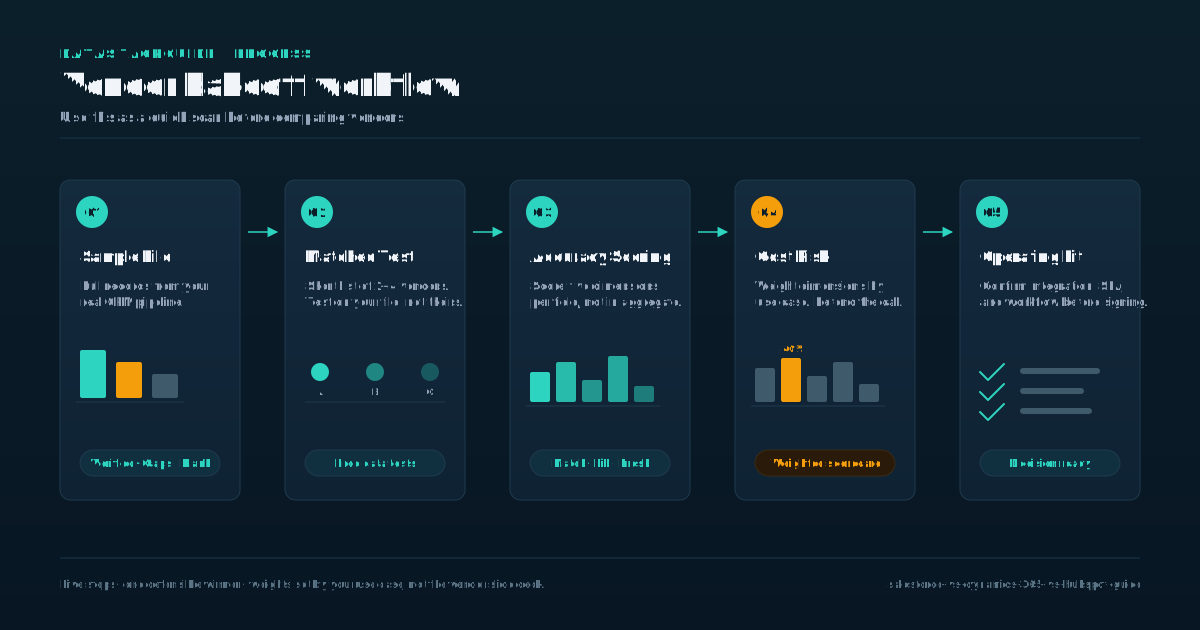
Evaluate AI features against your data quality, your admin capacity, and your compliance requirements before committing.
Who Should Choose Which CRM
Pick Salesforce if you have a large sales team, complex multi-product deal structures, specific compliance or security requirements, or deep integration needs with niche industry tools. Salesforce is also the safest choice if you plan to hire heavily for CRM roles, because the talent pool is the largest and training resources are the most mature.
- Avoid Salesforce if you are a team under roughly 30 people, you do not have or will not hire a dedicated admin, your deals are simple, or your growth motion is primarily marketing-led.
- In those cases you will pay enterprise prices for startup-level usage and spend more on configuration than on outcomes.
- The Copilot integration across the Microsoft stack is a real differentiator for organizations betting on Microsoft's AI roadmap.
Pick Dynamics 365 if your company runs on Microsoft, you want tight integration between CRM and ERP through Business Central or Finance, or you are in a regulated industry that already trusts Microsoft for compliance.
Avoid Dynamics 365 if you need a large third-party app ecosystem, your team is not technical enough to work with Power Platform, or you want the simplest possible onboarding experience.
Pick HubSpot if your growth is marketing-led, you are under roughly 200 employees, you do not want to hire a CRM admin, or you value fast time-to-value over deep customization. HubSpot's free CRM is also the best option for companies that are not yet sure they need a paid CRM.
Avoid HubSpot if you need deep customization for complex sales processes, your contact database is large enough that marketing contact pricing becomes painful, or you need enterprise-grade compliance features that require extensive custom controls.
Decision Framework
Most companies overthink this decision. If you are small and marketing-led, HubSpot is the obvious choice. If you are enterprise and sales-led, Salesforce is still the safest bet despite the cost.
- Dynamics 365 is the underrated middle option that gets ignored because it lacks Salesforce's brand power and HubSpot's marketing reach, but it is often the right answer for Microsoft-heavy organizations.
- The real mistake is over-buying for your current stage, not choosing the wrong CRM.
- A small company on Salesforce Enterprise is likely spending more than it needs to on both licenses and admin headcount.
A large company on HubSpot Free is limiting its sales team with a tool designed for smaller operations. Match the CRM to where you are now and to the tech stack you already run, not to where you hope to be in three years. Build your decision around three inputs.
First, your sales motion: inbound marketing favors HubSpot, complex field sales favors Salesforce, Microsoft-centric operations favor Dynamics 365.
Second, your existing tech stack: if you already pay for Microsoft 365 and Azure, Dynamics 365 extends that investment. If you run on Google Workspace and a mix of SaaS tools, HubSpot or Salesforce fit more naturally.
Third, your admin capacity: if you cannot hire or dedicate a CRM administrator, HubSpot is the only platform you can realistically self-manage at scale. You can migrate later, and migration cost is usually lower than years of over-spending on the wrong tier.
Pick the CRM that fits today, and revisit when your stage changes.
Tools Mentioned in This Guide
Related Categories
Sources
Frequently Asked Questions
Which CRM is cheapest for a 50-person sales team?
HubSpot at the Sales Hub Professional tier is typically the lowest annual cost for a 50-person team. Dynamics 365 Sales Professional sits in the middle.
Salesforce Professional is comparable on list price, but most teams need Enterprise, which pushes Salesforce to the highest total cost. Factor in implementation and admin costs, which run highest for Salesforce.
Review current pricing at the Salesforce and Dynamics 365 pricing pages linked in this guide.
Can I migrate from one CRM to another without losing data?
Yes, but plan for several months of migration work. The biggest risks are custom field mapping, workflow recreation, and historical activity data. Most teams hire a certified partner for the migration.
Budget a significant portion of your first-year license cost for migration services, more if you have heavy customization. Data integrity depends on how cleanly your source CRM is structured before the move.
Which CRM has the best reporting out of the box?
Dynamics 365 has the strongest native analytics through Power BI integration. Salesforce requires add-ons or Tableau for advanced reporting. HubSpot's built-in dashboards cover most common needs but lack the depth for complex multi-entity reporting at enterprise scale.
If reporting depth is a priority, Dynamics 365 and Salesforce outperform HubSpot.
Which CRM is best if we already use Microsoft 365 and Teams?
Dynamics 365 is the natural fit. It integrates natively with Outlook, Teams, SharePoint, and Azure, and Copilot works across the Microsoft stack. If your teams already live in Microsoft tools, Dynamics 365 reduces integration overhead and builds on existing licensing.
The Microsoft Trust Center documents compliance and security details for organizations in regulated industries.

Rome Thorndike
Rome Thorndike is the CEO & Founder of Provyx, which provides GTM intelligence and data validation for healthcare companies, including EngagedMD and BTL Industries. He led sales at Datajoy, acquired by Databricks, and sold analytics and enterprise platforms at Microsoft and Salesforce.
Connect on LinkedIn