Disadvantages of Microsoft Dynamics 365: What Operators Should Know
Microsoft Dynamics 365 combines CRM and ERP workloads into a single ecosystem. For organizations already embedded in Microsoft 365 and Azure, the integration appeal is strong. Operators evaluating this platform need a direct assessment of its limitations. This guide outlines the practical disadvantages of Dynamics 365, focusing on implementation complexity, licensing opacity, customization overhead, and operational friction. If your team is comparing Dynamics 365 against alternatives like Salesforce, Oracle, or NetSuite, you need to understand where the platform creates hidden costs, technical debt, and adoption friction. Vendor presentations often skip the operational realities of deploying and maintaining this software. We will look at the specific trade-offs in configuration, cost structure, and system performance. You will find details on how updates affect custom workflows, why specialized industries face gaps, and what integration looks like outside the Microsoft ecosystem. Use this analysis to pressure-test vendor claims before signing a multi-year agreement.
A plain-spoken guide to the drawbacks of Microsoft Dynamics 365, covering complexity, cost structure, integration trade-offs, and operational realities for teams evaluating the platform.
Complexity in Deployment and Configuration
Dynamics 365 is not a plug-and-play system. Initial setup demands detailed data mapping, role-based access planning, and workflow design before a single user logs in. Microsoft provides out-of-the-box templates for common scenarios like lead management and case resolution, but these templates rarely match real-world business processes without modification.
- Teams consistently underestimate the time required to align modules such as Sales, Customer Service, and Finance to actual operations.
- Even straightforward tasks like configuring lead routing rules or case escalation paths require navigating multiple admin centers, environment settings, and Power Platform tools.
- The admin surface area is wide, and settings are scattered across different interfaces with inconsistent naming conventions.
This complexity compounds when merging Dynamics 365 with existing ERP or CRM systems. Data cleansing, deduplication, and schema alignment become major undertakings that can delay go-live by weeks or months. Field mappings between source and target systems often reveal structural mismatches that require custom transformation logic.
The platform assumes a level of internal technical capacity that many mid-sized organizations lack.
Without dedicated Dynamics administrators or architects on staff, teams end up relying on third-party implementation partners whose rates can rival or exceed the software subscription itself. Configuration decisions made early in deployment are also difficult to reverse, particularly around security roles and data models, which means getting the foundation wrong carries long-term consequences.
Organizations should plan for a deployment phase that is measured in months, not weeks, and budget for external expertise accordingly.
Fragmented and Opaque Licensing Model
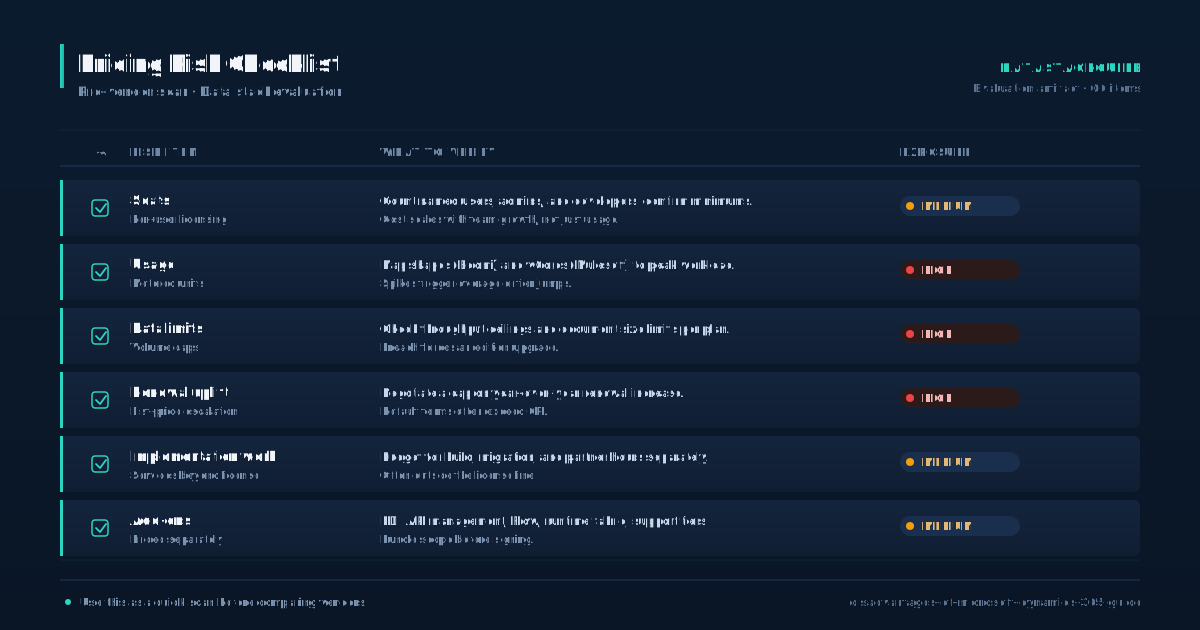
Microsoft structures Dynamics 365 licensing around individual apps and user tiers, making cost forecasting a persistent challenge. There are separate licenses for Sales, Customer Service, Field Service, Finance, Supply Chain Management, and Marketing, each with different pricing levels and feature boundaries.
Some capabilities are gated behind premium SKUs, while others require additional Power Platform capacity or Azure consumption charges that are billed separately.
- This modular approach means the advertised per-user price rarely reflects the actual cost of a working deployment.
- User-based licensing means costs scale linearly with headcount, but not all users need full access to every module.
- Microsoft offers lighter roles like Team Member licenses at lower price points, but these come with restricted functionality that often excludes the specific features those users need.
Downgrading users to save money frequently results in lost access to critical workflows, forcing upgrades back to full licenses. The lack of a clear, all-inclusive package pushes buyers into a patchwork of subscriptions that grows organically as requirements expand.
Volume licensing agreements may offer discounts for larger organizations, but these are negotiated individually and not publicly disclosed. This creates opacity in long-term budgeting, especially for growing companies that cannot predict future module needs.
Add the cost of Power Platform premium connectors, additional environments for testing and development, and Azure resources for data storage or integration, and the total cost of ownership can far exceed initial estimates. Buyers should demand a fully loaded cost projection before committing.
Customization Relies Heavily on Power Platform
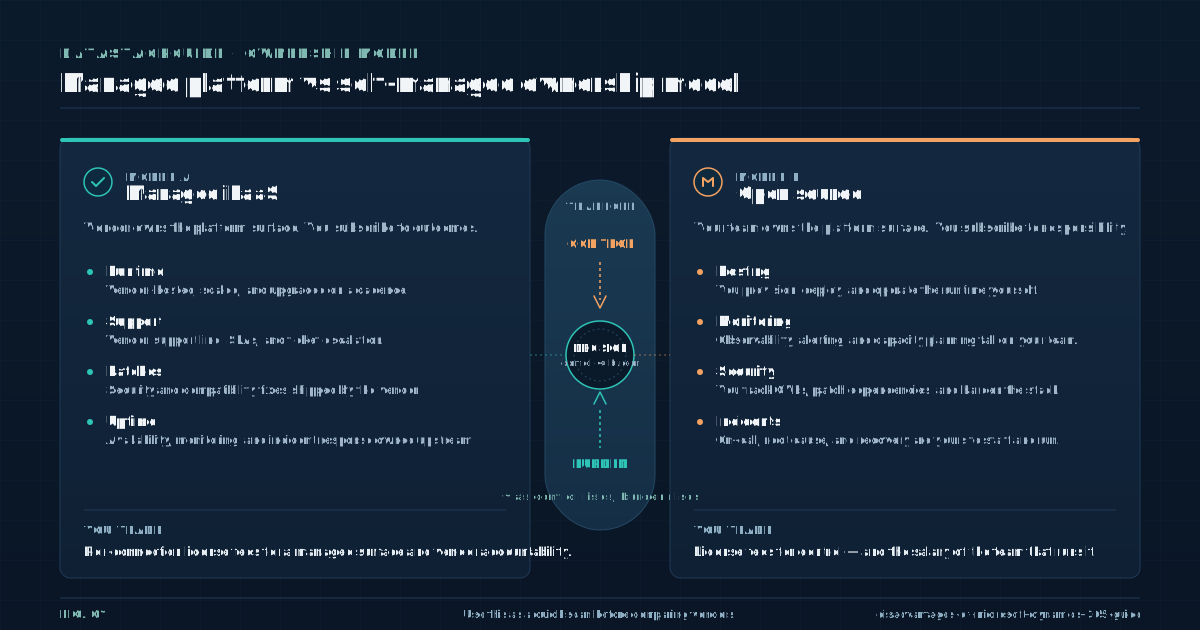
When Dynamics 365 does not meet a specific workflow requirement out of the box, customization typically shifts to Power Apps, Power Automate, or Power BI. Microsoft presents this as a flexible extension model, but in practice it introduces dependency on a secondary toolchain with its own learning curve, licensing requirements, and maintenance burden.
- Building and maintaining custom apps or automated workflows requires staff with Power Platform expertise, skills that are not commonly found in traditional CRM or ERP teams.
- Organizations often discover this gap mid-project, after the initial purchase decision has already been made.
- Debugging cross-platform issues becomes a regular time sink.
A Power Automate flow that fails to update a Dynamics record might fail for reasons buried in connector configuration, authentication scopes, or environment-specific settings. Troubleshooting requires familiarity with both the flow logic and the Dynamics data model, and error messages are not always descriptive enough to point to the root cause.
Teams without dedicated Power Platform developers end up spending significant time on trial-and-error fixes. Customizations can also break during platform updates.
Microsoft does not guarantee that custom scripts, plugins, or flows will continue functioning after a release, and deprecated connectors or API changes can silently disable workflows.
The promise of low-code development often gives way to a need for professional developers, which undermines the efficiency and cost-savings claims that motivated the customization approach in the first place. Organizations should treat Power Platform customization as a long-term development investment, not a quick fix.
Integration Works Best Only Within Microsoft Ecosystem
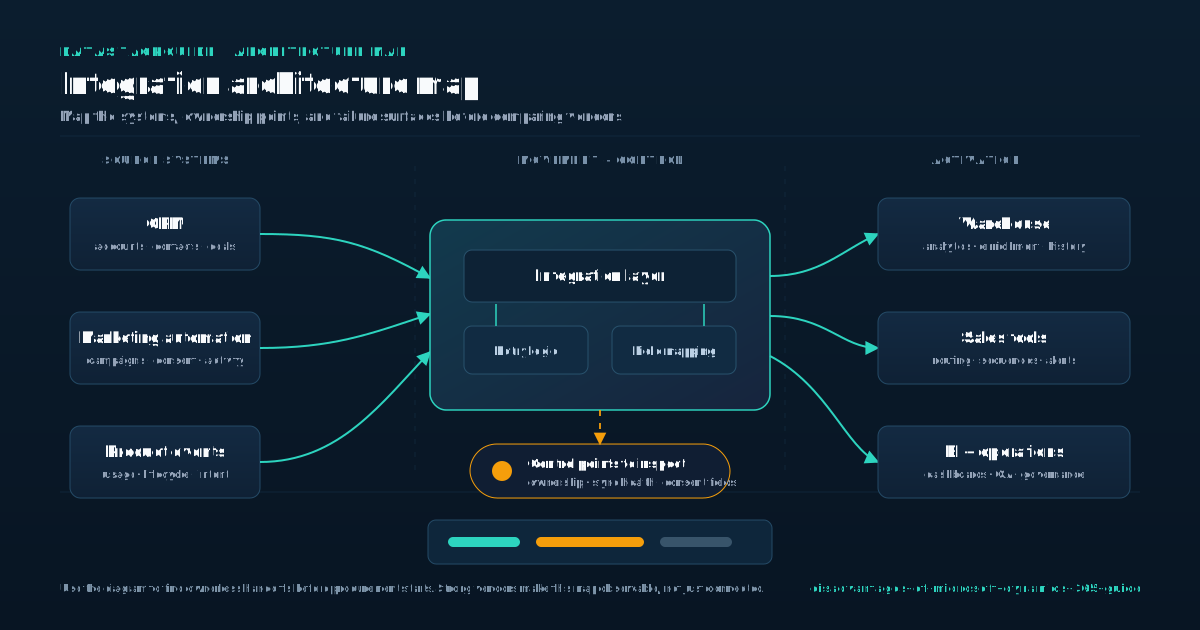
Dynamics 365 integrates smoothly with Microsoft 365, Azure Active Directory, Microsoft Teams, and other Microsoft cloud services. For organizations already standardized on Microsoft infrastructure, this integration is a genuine advantage. But for teams using non-Microsoft tools like Google Workspace, Salesforce, SAP, Oracle, or niche industry-specific software, integration becomes significantly more involved.
- Native connectors exist for some popular platforms, but deeper cross-system workflows often require Azure Logic Apps, custom APIs, or third-party middleware such as MuleSoft or Dell Boomi.
- Data synchronization across heterogeneous systems introduces its own set of problems.
- Latency between sync cycles can cause stale data in one system while another has already updated.
Conflicts arise when records are modified in two systems simultaneously, and resolving those conflicts requires custom logic or manual intervention. Real-time integration is possible but adds architectural complexity and cost, often involving Azure Service Bus or Event Grid configurations that require specialized knowledge to build and maintain.
Microsoft promotes its cloud ecosystem as a strength, and for committed Microsoft shops it is. But that same ecosystem can become a lock-in mechanism.
Once business logic, data models, and reporting are deeply embedded in Dynamics 365 and Power Platform, adopting best-of-breed tools outside the Microsoft stack becomes increasingly expensive and technically painful. Organizations evaluating Dynamics 365 should honestly assess their current and future technology mix.
If the roadmap includes non-Microsoft tools for marketing automation, e-commerce, or specialized analytics, the integration cost and complexity should be factored into the decision from day one, not discovered after deployment.
Performance and Scalability Trade-offs
Dynamics 365 runs on Azure infrastructure, which generally provides reliable uptime and global availability across regions. However, performance depends heavily on configuration, data volume, and customization load. Large datasets can lead to slow query response times, particularly in reporting and analytics modules where aggregate queries pull from multiple related tables.
- Organizations with high transaction volumes or complex reporting needs may find that standard configurations do not deliver acceptable response times without additional tuning.
- Custom workflows and plugins can degrade system performance if not properly optimized.
- A poorly written plugin triggered on every record update can introduce noticeable latency into what should be instantaneous operations.
Microsoft provides performance monitoring tools, but interpreting the data and acting on it requires expertise that many teams lack. Identifying whether a slowdown stems from a custom plugin, a data indexing issue, or a platform-level constraint often requires escalation to Microsoft support, which adds time to resolution.
Scalability is available, but it comes at a cost. Additional Azure resources, premium connectors, or third-party optimization tools may be necessary to maintain performance as data and user volumes grow.
Organizations should not assume that cloud infrastructure automatically solves performance problems. Without proactive monitoring, indexing strategies, and periodic cleanup of unused customizations, performance can degrade gradually until users start complaining.
Budgeting for performance management as an ongoing operational activity, not a one-time setup task, is essential for teams that expect transaction growth or expanded reporting complexity over time.
User Adoption Challenges
Despite claims of intuitive design, user adoption of Dynamics 365 often lags behind expectations. The interface, while visually modern, can be overwhelming for non-technical staff due to the density of fields, navigation paths, and system-generated prompts.
A single account record might display dozens of fields across multiple tabs, many of which are irrelevant to the person viewing it.
- Customizing forms to show only relevant fields is possible but requires upfront configuration effort that teams frequently skip under timeline pressure.
- Training materials are available from Microsoft, but they assume a baseline familiarity with CRM concepts and Microsoft design patterns.
- Users coming from simpler tools or spreadsheet-based workflows often struggle with the mental model Dynamics 365 imposes.
Role-specific dashboards help focus attention, but configuring them effectively requires understanding both the data model and the specific needs of each user group. Off-the-shelf dashboards rarely match real-world priorities without adjustment.
Teams report common patterns: sales representatives skip required data entry fields, service agents bypass suggested workflow steps, and finance staff revert to spreadsheets for calculations they do not trust in the system.
These behaviors undermine data integrity and process consistency, which are the primary reasons for adopting a centralized platform in the first place. Adoption issues are rarely caused by user resistance alone. They often reflect poor initial configuration, mismatched expectations during the sales cycle, or insufficient training investment.
Organizations should plan for phased rollouts with dedicated change management support rather than expecting users to adapt through self-service learning.
Update and Version Control Risks
Microsoft releases platform updates multiple times per year, and organizations have limited control over timing and content. While updates include new features and security patches, they can also disrupt custom workflows, integrations, or interface modifications. Microsoft does not always provide advance notice of breaking changes at a level of detail that allows teams to prepare.
- A Power Automate flow that relies on a specific connector version may stop functioning after an update, and custom scripts using deprecated APIs can fail without warning.
- Maintaining a separate test environment to validate updates before deployment is best practice, but many organizations lack the resources or discipline to do this consistently.
- Testing requires replicating production data and customizations into a sandbox, running through critical workflows, and documenting any failures.
For teams without dedicated QA staff, this process is often skipped, and updates are applied directly to production. When something breaks, the resolution path involves Microsoft support tickets, community forums, or third-party consultants, all of which add time and cost.
The lack of control over update timing and content means teams must treat platform maintenance as an ongoing operational task, not a one-time project. Power Automate flows, custom plugins, and third-party integrations all need periodic review and remediation.
This continuous change cycle increases the total cost of ownership over time and creates a steady stream of small disruptions that erode user confidence. Organizations should staff for this reality or contract with a managed service provider that can handle update validation and remediation on a recurring basis.
Evaluating Fit for Specialized Industries
Dynamics 365 offers industry-specific templates and accelerators for sectors like retail, manufacturing, healthcare, and financial services. These templates provide a starting point, but they are broad approximations designed for common scenarios.
Organizations with complex compliance requirements, specialized supply chain models, or unique service delivery processes often find that the templates address only a fraction of their actual needs.
- The remaining gap must be closed through customization, third-party add-ons, or manual workarounds.
- Life sciences companies with strict audit trails and regulatory documentation requirements may need extensive customization to meet standards like FDA 21 CFR Part 11 or EU Annex 11.
- Construction firms managing project-based costing, progress billing, and multi-entity accounting may find that the finance module lacks native support for their accounting methods.
Nonprofit organizations tracking grants, restricted funds, and program-specific reporting face similar gaps. In each case, the effort to adapt Dynamics 365 can consume significant time and budget, sometimes exceeding the cost of the platform itself. Competing platforms with deeper vertical functionality may offer better out-of-the-box alignment for these industries.
Vertical-specific CRM and ERP products often include prebuilt compliance workflows, industry-standard reporting formats, and terminology that matches how practitioners actually work.
When evaluating Dynamics 365 for a specialized industry, operators should map their critical requirements against the platform's native capabilities before assuming customization will close the gap. If the customization list is long, the total cost and timeline will grow accordingly, and the platform's standardization benefits diminish.
An honest gap analysis early in the evaluation process can prevent costly misalignment later.
Sources
Frequently Asked Questions
Is Microsoft Dynamics 365 difficult to learn for non-technical users?
Yes, despite its modern interface, Dynamics 365 has a steep learning curve for users unfamiliar with CRM or ERP systems. Navigation involves multiple modules, ribbons, and context menus that are not always intuitive.
Data entry forms can be dense, and system behaviors like auto-populated fields or workflow triggers are not always transparent. Training and role-specific guidance are usually required to achieve consistent usage.
Does Dynamics 365 require additional tools to function properly?
In most real-world deployments, yes. While the core modules provide basic functionality, organizations typically need Power Apps for custom forms, Power Automate for workflows, and Power BI for reporting. These are not optional extras.
They are essential to tailor the system to business needs. This expands the technical footprint and increases dependency on Microsoft's broader platform.
How does Dynamics 365 handle data migration from legacy systems?
Data migration is possible using built-in tools or Azure-based services, but it is rarely straightforward. Legacy data often requires cleaning, deduplication, and schema alignment before import.
Complex relationships like linking historical customer interactions to new accounts can break if not mapped correctly. Many organizations hire third-party specialists to manage migration, as errors can compromise reporting and compliance.
Can Dynamics 365 be used effectively without an internet connection?
No. Dynamics 365 is a cloud-native platform requiring continuous internet connectivity. Offline access is limited and not supported natively in most modules. Users in remote or low-connectivity environments may face disruptions.
While third-party tools offer limited offline capabilities, they add complexity and are not officially supported by Microsoft.
Is it possible to switch from Dynamics 365 to another platform later?
Yes, but it can be difficult. Data stored in proprietary formats and deep customizations using Power Platform tools make export and migration challenging. Reports, workflows, and business logic tied to Dynamics-specific features may not translate directly to other systems.
Exiting the platform typically requires a full data audit and significant repatriation effort.

Rome Thorndike
Rome Thorndike is the CEO & Founder of Provyx, which provides GTM intelligence and data validation for healthcare companies, including EngagedMD and BTL Industries. He led sales at Datajoy, acquired by Databricks, and sold analytics and enterprise platforms at Microsoft and Salesforce.
Connect on LinkedIn