B2B Contact Data Guide (2026)
B2B contact data is the information that identifies and describes the people who make purchasing decisions at other companies. It includes fields like email addresses, phone numbers, job titles, company names, and industry codes. This data powers outbound sales, account research, lead scoring, and customer enrichment. The primary challenge is accuracy. Most teams buy contact data as a static list, but that approach fails because data decays quickly. A better strategy starts with understanding which fields you actually need, how recently they were verified, and how they were sourced. You also need a plan for moving that data into your CRM or sales engagement platform. This guide covers the key concepts behind B2B contact data, explains how to evaluate accuracy, and shows you how to build a data pipeline that keeps your records fresh and your outreach effective.
B2B contact data explained: what it includes, how vendors source it, how to test accuracy, and when to buy a database versus build lists manually.
What B2B Contact Data Means
B2B contact data is the structured information that identifies and describes the people who make purchasing decisions for their companies. This includes names, job titles, direct dial phone numbers, email addresses, company names, industry codes, and revenue ranges. The practical tradeoff sits between raw volume and verified accuracy.
- Apollo and ZoomInfo both offer large databases, but their pricing tiers reflect how recently each record was confirmed.
- Apollo's lower-tier plans give you access to a vast pool of contacts, many of which may be months old.
- ZoomInfo's higher-priced plans include more frequent verification cycles, but you pay a premium for that freshness.
LinkedIn Sales Navigator provides current profile data but no direct email or phone, requiring a separate tool like LeadIQ or Cognism to extract and verify those details. The mistake buyers make is choosing a vendor based on total record count without checking the average age of the data in their target segments.
A practical decision rule is to test a sample of a focused sample from any provider against your own CRM bounce rates before committing to an annual contract. The cheapest per-record price means nothing if half your outreach fails.
For most B2B teams, the correct choice is a mid-tier plan from a major provider combined with a real-time verification tool, not the largest database at the lowest cost.
What a Useful Contact Record Includes
A useful B2B contact record goes beyond name, title, and email. The difference between a lead that converts and one that wastes your time often comes down to three specific fields: direct dial phone number, verified mobile number, and a company-level technographic signal like CRM or ERP usage.
- For example, a sales development rep targeting VP-level buyers at mid-market firms will close more meetings if the record includes a direct dial and a note that the prospect's company uses Salesforce.
- Without those two data points, you are guessing at both reachability and relevance.
- The mistake most buyers make is paying for volume when they should pay for completeness.
Pricing pages from Apollo, ZoomInfo, and Cognism reveal a clear tradeoff. Apollo's lowest tier gives you basic contact fields but charges extra for mobile numbers and intent data. ZoomInfo's pricing page shows that their most expensive plans include technographics and direct dials as standard.
LinkedIn Sales Navigator plans give you profile access but no direct contact data, forcing you to use a separate tool like LeadIQ to extract emails and phones. The decision rule is simple: if your team dials 50 prospects a day, pay for direct dials and mobile numbers.
If your team sends 200 emails a day, pay for verified email deliverability scores. The hidden cost of incomplete records is time wasted on bad outreach. A record with only a work email and a generic title like "Director" forces your rep to guess the person's actual role and whether they influence buying decisions.
Cognism's pricing page highlights compliance features, which matter if you operate in Europe or need GDPR-safe data. Before you buy, check if the vendor's sample records include at least three contact methods and one firmographic field like company size or industry. That combination turns a contact record from a name into a usable asset.
How Contact Data Is Sourced
The most common sourcing method is scraping public web data, which feeds the vast majority of B2B contact databases. Providers like ZoomInfo and Cognism crawl corporate websites, SEC filings, job boards, and social profiles to assemble records. This approach yields volume but carries a known tradeoff: data ages quickly.
- A contact scraped from a LinkedIn profile in January may have changed roles by March.
- The mistake buyers make is assuming all sourced data is equally fresh.
- When you evaluate a provider, ask for the average age of their records, not just the total count.
Apollo, for example, offers lower pricing tiers but often surfaces older contacts, while ZoomInfo's higher pricing reflects more frequent re-scraping cycles. A second major source is user-generated data from sales engagement tools. LeadIQ and similar platforms allow sales reps to capture contacts directly from LinkedIn Sales Navigator during prospecting.
This data is inherently more accurate because it is verified by a human at the point of capture. The tradeoff is scale: you cannot build a million-record list this way.
The practical decision rule is to use user-sourced data for high-value accounts where accuracy matters more than volume, and scraped data for broad top-of-funnel outreach. Cognism's pricing reflects this hybrid model, combining scraped European data with user-verified records for regulated markets.
A third source, often overlooked, is direct opt-in data from event registrations, content downloads, and webinar attendance. This data is the most accurate because the contact provided it themselves, but it requires your own marketing engine to generate. The mistake is treating this as a secondary source rather than a primary one.
For any B2B contact strategy, the rule is simple: prioritize self-sourced data first, user-verified data second, and scraped data third. Your budget should follow that order, not the other way around.
How to Test Accuracy Before Buying
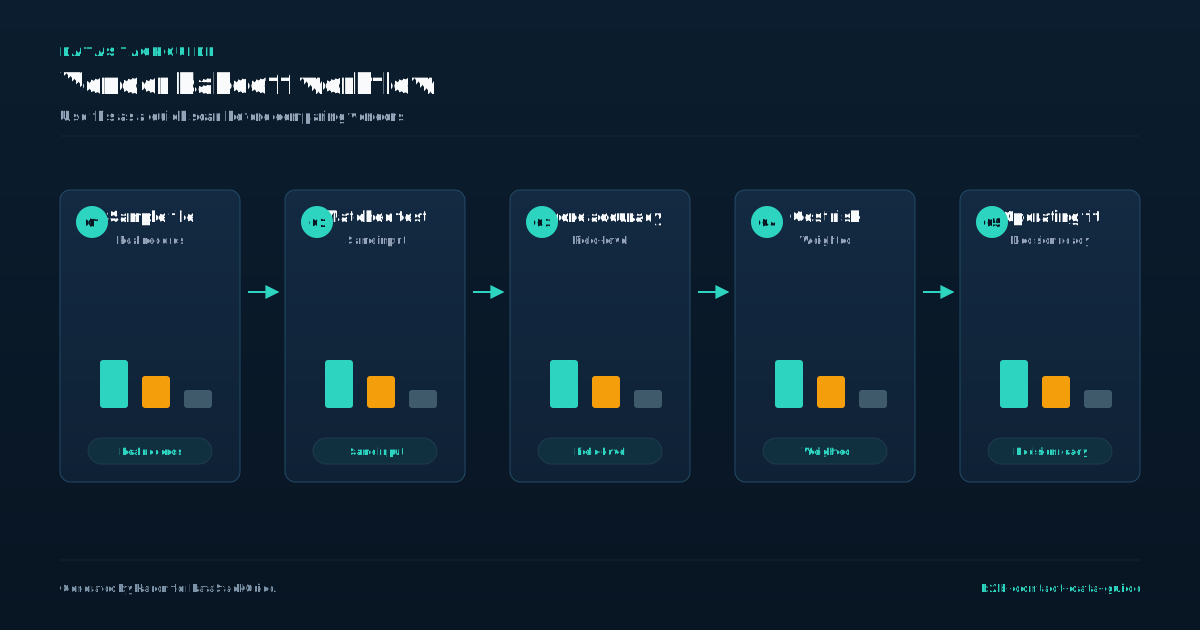
Before you commit to a vendor, run a controlled test on your own ICP. Pick fifty records from Apollo, ZoomInfo, LinkedIn Sales Navigator, LeadIQ, or Cognism that match your ideal customer profile. Send a double-blind email campaign: use the purchased data for one half and your own manually verified data for the other half.
- Measure bounce rate, reply rate, and meeting booked rate.
- The most common mistake buyers make is testing only email addresses.
- Email verification tools can pass a syntax check but still deliver to spam folders or dead inboxes.
You need to test phone numbers and direct dials too. Call ten numbers from the sample list. If more than two are disconnected or belong to the wrong person, the vendor's claimed accuracy is inflated. Also check job title freshness.
A contact listed as "VP of Sales" at a company that promoted them to "CRO" six months ago is a sign the vendor refreshes data quarterly at best. Tradeoffs matter here. Apollo and ZoomInfo offer large volumes at lower per-record costs, but their accuracy degrades faster for small companies and niche roles.
LinkedIn Sales Navigator gives you real-time signals but requires manual export and lacks direct dials. LeadIQ and Cognism sit in the middle with higher per-record cost but better verification workflows.
When to Buy Data Versus Build Lists Manually
The decision to buy contact data or build lists manually depends on your team size, target volume, and tolerance for outdated records. The break point comes around a focused contact sample per month. Below that threshold, manual building with Sales Navigator and LeadIQ's free tier gives you fresher data and zero waste.
- Accuracy is the hidden cost of manual lists.
- The mistake most buyers make is signing a yearly contract for a tool like ZoomInfo when their ICP is narrow.
- If you target only Series B fintech CFOs in New York, a manual list of 200 names will outperform a bought list of 10,000 irrelevant records.
Use this rule: buy data when your target market has more than 5,000 accounts and you need at least 100 new contacts per week. Build manually when your list is under 500 accounts or your ICP changes quarterly. Test a paid tool with a monthly plan first.
Run a thirty-day comparison between your manual list and the bought list. If it drops below, your manual process is better.
How Contact Data Fits Your Sales Stack
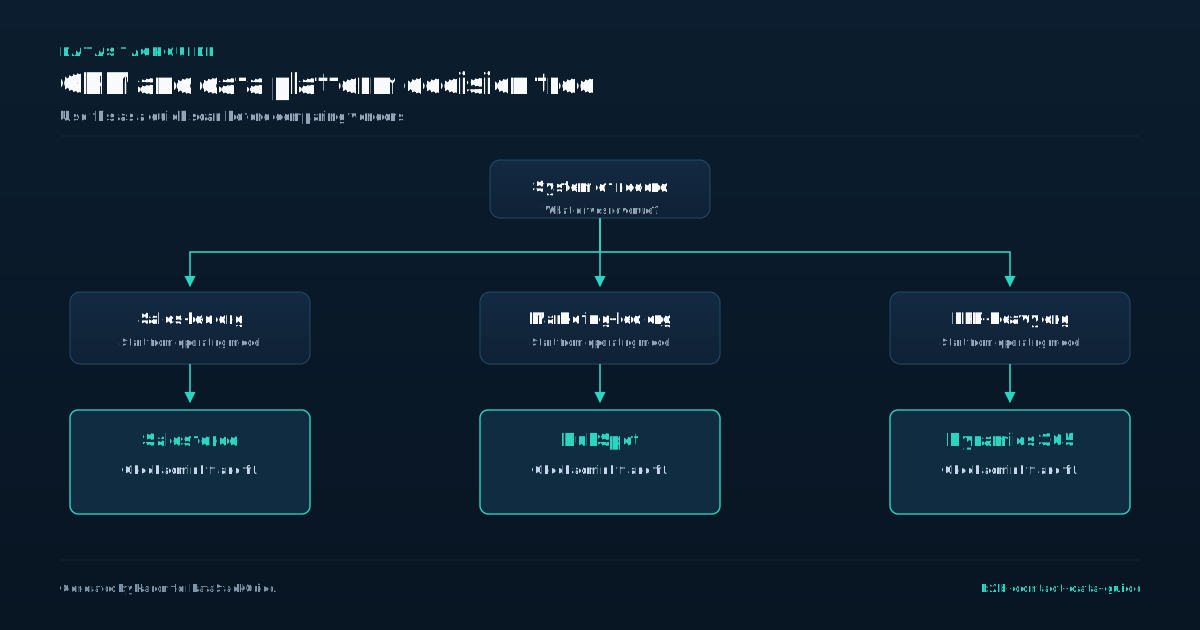
Your CRM is a filing cabinet, not a phone book. It stores past conversations but does not tell you who to call next. B2B contact data fills that gap by feeding your sales stack with verified names, titles, and direct dials.
- Without it, your outbound efforts rely on stale LinkedIn profiles or generic company inboxes.
- Choose based on your deal size, not your feature wishlist.
- Accuracy is the hidden tax on cheap data.
A sales development rep using only LinkedIn Sales Navigator plans might find 50 leads per hour, but with Apollo pricing or ZoomInfo pricing page data, that same rep can pull a focused contact sample with verified emails in the same time.
That bounce rate kills your sender reputation and wastes your LeadIQ pricing investment in sequencing tools.
Cognism pricing reflects their focus on European GDPR compliance, which matters if you target regulated industries. A common mistake is buying data first and cleaning it later. Instead, test a sample of a mid-sized validation sample against your CRM. Your sales stack works best when contact data is the middle layer, not the foundation.
The foundation is your ICP definition. The top layer is your outreach tool. Data sits between them, matching your ideal customer profile to real people. For example, if you sell to VP-level engineering leaders at Series B SaaS companies, your data provider must filter by title, company size, and funding stage simultaneously.
ZoomInfo pricing page shows they offer this, but Apollo pricing gives you similar filters at a lower entry point.
Common Mistakes That Create Bad Data
Buyers often assume that more contacts means better pipeline, but volume without verification creates a database that costs time and money. A common mistake is purchasing a large list from a vendor that scrapes data without confirming it against primary sources.
- The decision rule here is simple: check the vendor's data refresh frequency and source methodology before paying.
- Apollo and ZoomInfo both publish pricing pages that show tiered plans, but the real difference is in how often they re-verify records.
- Apollo's lower tiers may update quarterly, while ZoomInfo's enterprise plans claim weekly verification.
If your team needs current data for outbound campaigns, paying for a higher refresh rate is cheaper than wasting reps' time on dead leads. Another frequent error is ignoring the difference between firmographic and contact-level accuracy.
A company's industry and revenue might be correct, but the specific decision-maker's role or phone number could be outdated. LinkedIn Sales Navigator plans offer direct access to profiles, but the data you export is only as good as the last time the user updated their job title.
LeadIQ and Cognism both integrate with LinkedIn to capture real-time changes, yet many buyers skip this step and rely on static exports. A practical tradeoff: using a tool that syncs with your CRM to flag changes costs more upfront but prevents the slow decay of your database.
Without that, you end up with a list of people who left their roles six months ago. Finally, teams often fail to set a clear standard for what "good data" means for their specific use case. The mistake is applying the same quality threshold to every field.
Instead, define which attributes matter most for your workflow, email deliverability for campaigns, phone numbers for calls, or role seniority for targeting, and test a sample before committing to a vendor. This approach saves you from paying for fields you don't need and ensures the data you do buy actually drives results.
Buying Checklist for B2B Contact Data
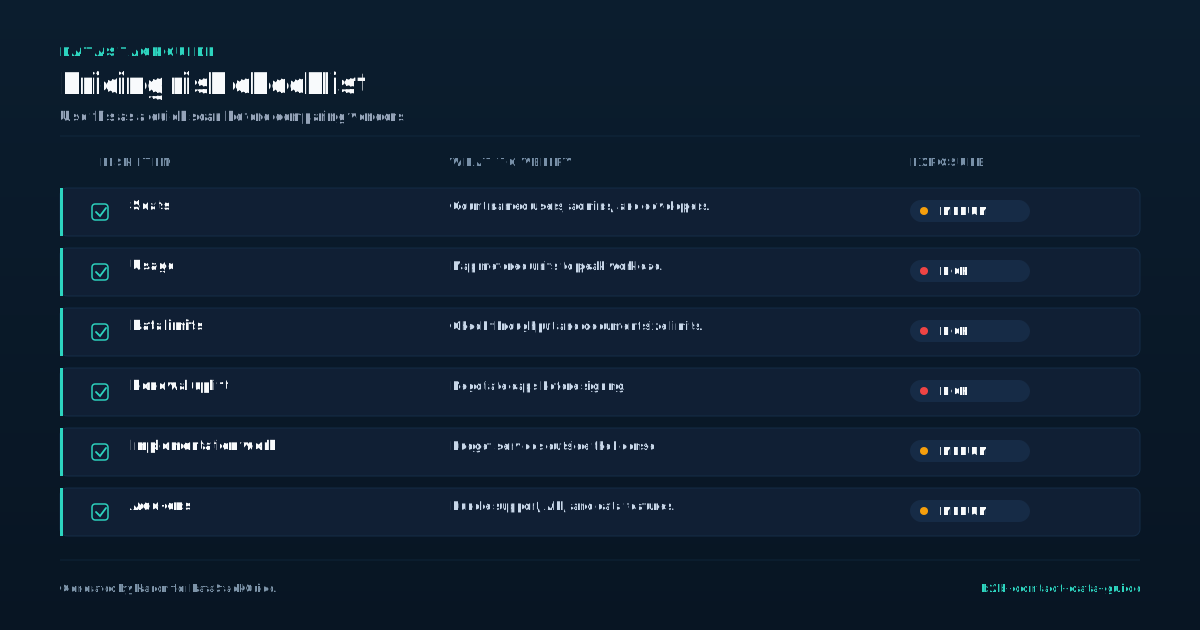
Before you buy, decide whether you need volume or precision. Apollo and ZoomInfo both offer tiered plans: Apollo's lower tiers give you large pools of contacts with moderate accuracy, while ZoomInfo's higher tiers include direct-dial phone numbers and intent signals.
- If you only need email outreach, LeadIQ's per-seat model may be cheaper than a full ZoomInfo subscription.
- Always request a sample of a smaller validation sample from your target industry and run them against your CRM to check bounce rates and role relevance before signing.
- Watch for hidden costs that inflate your total spend.
Cognism's pricing includes GDPR-compliant data for European markets, which saves legal overhead if you operate in the EU. Some vendors charge extra for API access, team seats, or integrations with your sales engagement platform.
Calculate your true cost per usable contact by dividing the annual contract value by the number of contacts your team actually reaches, not the total in the database. Set a renewal clause that lets you audit accuracy every quarter.
If your provider's data degrades below an agreed threshold, you should be able to pause payment or switch to a cheaper tier. Start with a six-month contract on a mid-tier plan, measure your connect rate and reply rate, then scale up only if the data directly drives pipeline.
Tools Mentioned in This Guide
Related Categories
Sources
Frequently Asked Questions
What is B2B contact data?
B2B contact data is the specific information used to identify and reach decision-makers at other businesses. It includes names, job titles, direct phone numbers, email addresses, and company details like industry and revenue.
This data powers sales prospecting, account-based marketing, and lead generation. Accuracy is critical because outdated or incorrect contacts waste time and damage sender reputation. High-quality B2B contact data is verified, enriched, and compliant with privacy regulations.
What is the best source of B2B contact data?
The best source depends on your use case. For high accuracy, buy intent data from providers like ZoomInfo or Lusha, which verify contacts through direct company sources and email verification.
For cost effectiveness, build your own list using LinkedIn Sales Navigator and company websites, then validate with tools like Hunter. Io. Avoid free databases; they often have stale or incorrect data.
Prioritize sources that offer real time verification and GDPR compliance.
How accurate is B2B contact data?
B2B contact data accuracy varies widely by source. Regular verification through email validation tools and phone number checks is essential. For critical campaigns, real-time verification at point of use yields the highest accuracy.
Should I buy B2B contact data or build lists manually?
Buying B2B contact data saves time but risks outdated or inaccurate records. Manual list building gives you control over quality and relevance, but requires significant effort.
For most teams, a hybrid approach works best: buy targeted data from a reputable provider to fill gaps, then verify and enrich it manually. Prioritize accuracy over volume.
If your budget is tight and you need high precision, build your own lists. If speed matters more, buy from a vendor with a strong data refresh policy.
What fields should a B2B contact data record include?
B2B contact data is the professional information used to identify and reach decision makers at other companies. It includes names, job titles, company names, email addresses, and phone numbers.
This data is essential for sales and marketing teams to build prospect lists and launch outreach campaigns. Accuracy is a major concern, as outdated or incorrect contact data wastes time and reduces campaign effectiveness.

Rome Thorndike
Rome Thorndike is the CEO & Founder of Provyx, which provides GTM intelligence and data validation for healthcare companies, including EngagedMD and BTL Industries. He led sales at Datajoy, acquired by Databricks, and sold analytics and enterprise platforms at Microsoft and Salesforce.
Connect on LinkedIn